A pure-Python, open-source GPU-resident implementation of SIFT
built on CuPy and Numba CUDA kernels — faster and yet more accurate.
Zero-copy DLPack interop to PyTorch frees your downstream DL steps from CPU PCIe bottlenecks.
PySIFT is a pure-Python, open-source GPU-resident implementation of the
Scale-Invariant Feature Transform (SIFT) built on CuPy and Numba CUDA kernels which is
faster and yet more accurate. It runs the entire detection-to-descriptor pipeline on your
NVIDIA GPU with zero-copy DLPack interop to PyTorch so that your downstream DL steps
will be free from CPU PCIe bottlenecks.
Unlike OpenCV's SIFT (compiled C++ running on CPU), PySIFT keeps tensors in VRAM from
the moment you load the image until your downstream pipeline (matching, RANSAC,
bundle adjustment, rendering) consumes it. For pipelines in medical imaging,
drone stitching, SLAM, robotics, and 3D reconstruction, this eliminates the bottleneck that
makes CPU-based SIFT a liability.
GPU-Resident
All 5 pipeline stages run on GPU. Descriptors stay in VRAM —
no CPU round-trips. Zero-copy handoff to PyTorch, CuPy, or any DLPack consumer.
Deterministic
Bitwise-identical output across runs. No non-deterministic CUDA ops.
Warp-shuffle reductions replace atomicAdd for reproducibility.
Drop-in Compatible
Returns cv2.KeyPoint objects and NumPy descriptors by default.
Swap cv2.SIFT_create() for PySIFT() — everything else stays the same.
Benchmark Results
Tested against OpenCV SIFT on 4 standard benchmarks (RTX 3050 Laptop GPU, 4 GB VRAM):
PySIFT implements Lowe's SIFT algorithm (IJCV 2004) entirely on the GPU.
Every stage — from image preprocessing to descriptor output — executes
as CUDA kernels via CuPy and Numba. The image never leaves VRAM.
1. CLAHE Preprocessing
→
2. Gaussian Pyramid
→
3. DoG Extrema
→
4. Orientation Assignment
→
5. Descriptor Computation
Stage 1: CLAHE Preprocessing
Adaptive histogram equalization (CLAHE) normalizes local contrast before
building the scale-space pyramid. This yields 40-80% more usable keypoints
on night, haze, and low-contrast images vs. raw input — critical for
drone imagery at dawn/dusk and medical scans with uneven illumination.
Stage 2: Gaussian Scale-Space Pyramid
The image is progressively blurred and downsampled across octaves. PySIFT
supports fp16_pyramid=True for half-precision storage (2x memory savings
on VRAM-constrained GPUs like Jetson or RTX 3050), with full fp32 precision during
DoG subtraction to avoid catastrophic cancellation.
Stage 3: DoG Extrema Detection
Difference-of-Gaussians (DoG) volumes are computed by subtracting adjacent
Gaussian levels. Local extrema in 3D (x, y, scale) are candidate keypoints.
Sub-pixel refinement via Taylor expansion and edge-response rejection
(Hessian ratio test) filter the candidates.
Stage 4: Orientation Assignment
A gradient orientation histogram (36 bins) around each keypoint determines
its dominant orientation, making descriptors rotation-invariant.
PySIFT also supports learned orientation via OriNet
(orientation='orinet').
Stage 5: Descriptor Computation
A 128-dimensional histogram of oriented gradients over a 16x16 patch
(4x4 spatial bins, 8 orientation bins). PySIFT applies RootSIFT normalization
by default (L1 + sqrt), which improves matching over raw L2-normalized SIFT.
With dsp=True, multi-scale descriptor pooling further boosts robustness.
Zero-copy output: Use gpu_output=True to keep keypoints
and descriptors as CuPy arrays in VRAM. Pass directly to GPU-based matchers
without any PCIe transfer.
GPU-Residency: Why It Matters
In a typical vision pipeline (detect → match → estimate → reconstruct),
CPU-based SIFT forces a GPU→CPU→GPU round-trip at every stage boundary.
PySIFT eliminates this overhead entirely:
Pipeline
PCIe Transfers
GPU Idle Time
OpenCV SIFT + PyTorch
4 per image pair
~40% of pipeline
PySIFT + CuPy matching
0 (until final output)
<5%
Keypoint Detection
PySIFT detects scale-invariant keypoints across a Gaussian pyramid.
The default configuration (4 octaves, 3 scales per octave, contrast threshold 0.04)
closely matches OpenCV SIFT's behavior while running entirely on the GPU.
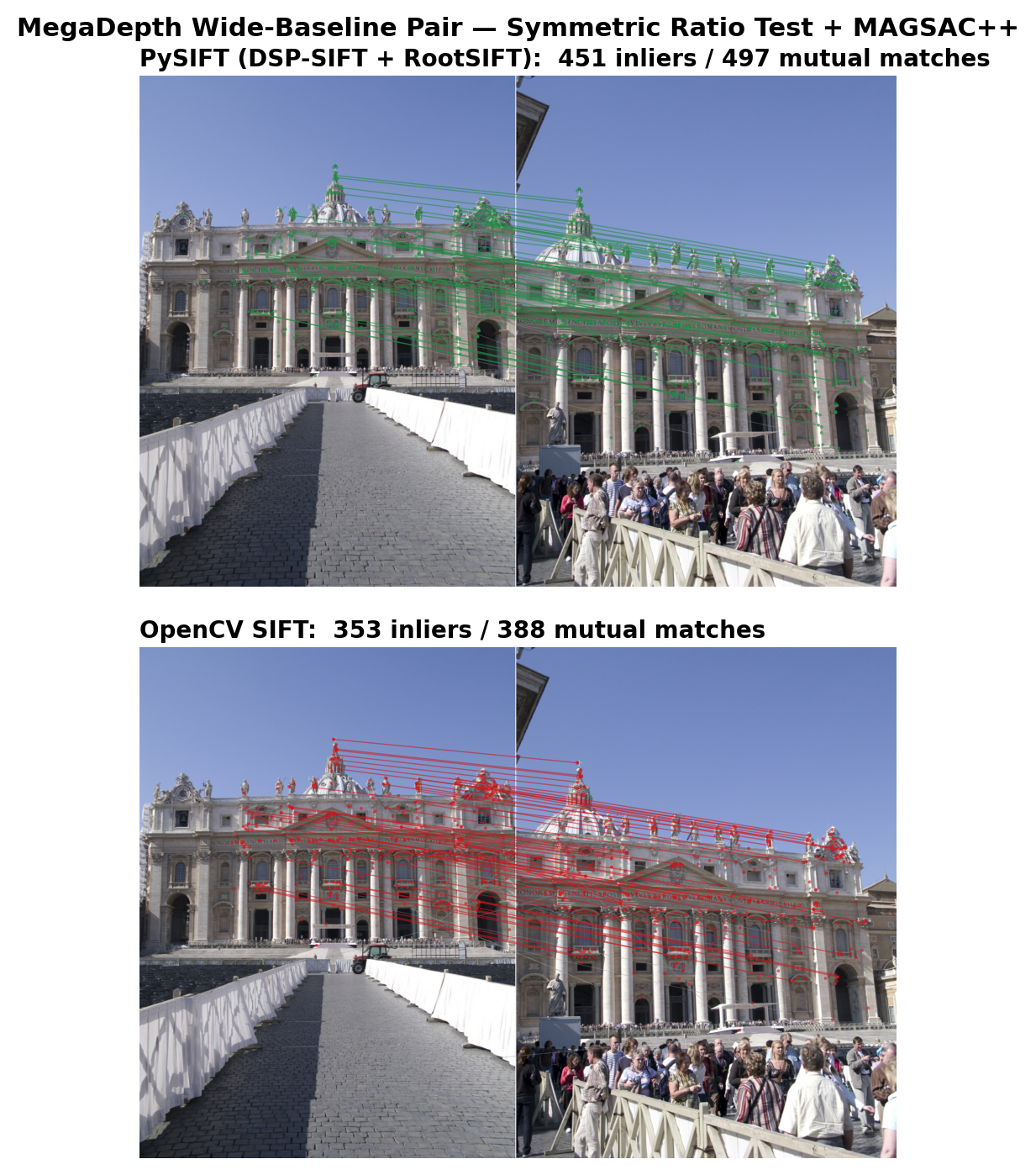
PySIFT feature matching on landmark images. Green = PySIFT inliers, Red = OpenCV inliers.
# Keep everything on GPU as CuPy arrays
kp_gpu, desc_gpu = sift.detectAndCompute(gray, None, gpu_output=True)
# kp_gpu: CuPy (N, 4) -- [x, y, size, angle]# desc_gpu: CuPy (N, 128) -- ready for GPU matching
Tunable Parameters
Parameter
Default
Effect
n_octaves
4
More octaves = more scale coverage, more keypoints
n_scales
3
Scale levels per octave (S in Lowe 2004)
contrast_thresh
0.04
Lower = more keypoints on low-contrast regions
edge_thresh
10.0
Higher = keep more edge-like keypoints
double_image
True
2x upsample (octave -1), matches OpenCV default
rootsift
True
L1+sqrt normalization (improves matching)
Adaptive contrast: PySIFT automatically adjusts
contrast_thresh based on image statistics (night scenes get lower thresholds).
You can override this by setting the parameter explicitly.
Feature Matching
PySIFT descriptors are L2-compatible (or RootSIFT by default), so any
standard matcher works. For best results, combine Lowe's ratio test with
mutual nearest-neighbor (MNN) filtering.
CPU Matching (OpenCV BFMatcher)
bf = cv2.BFMatcher(cv2.NORM_L2)
raw = bf.knnMatch(desc_a, desc_b, k=2)

# Lowe's ratio test
good = [m for m, n in raw if m.distance < 0.85 * n.distance]
GPU Matching (Zero PCIe Transfer)
When using gpu_output=True, descriptors are CuPy arrays in VRAM.
Match entirely on GPU using matmul-based brute-force:
A→B only. A keypoint in image A finds its best match in B,
but that match in B might prefer a different keypoint in A.
This produces ~30-40% false matches that poison RANSAC.
Mutual NN Matching
Requires A→B and B→A to agree.
Only keeps matches where both images pick each other as closest.
Eliminates most outliers while preserving true matches.
DSP-SIFT (Dong & Soatto, CVPR 2015) computes descriptors at multiple
Gaussian scale radii around each keypoint and averages the histograms.
This makes each descriptor an implicit mixture over scales, dramatically
improving robustness to scale estimation errors and viewpoint changes —
especially important for wide-baseline stereo in 3D reconstruction and
drone aerial imagery with varying altitude.
How DSP Pooling Works
For each keypoint, compute the standard descriptor patch radius r
Recompute the descriptor at 3 scaled radii: r/√2, r, r√2
The output is still a 128-dimensional descriptor — same size, better quality.
No change to matching code required.
Enable DSP-SIFT
# One flag enables DSP pooling
sift = PySIFT(dsp=True)

# Everything else stays the same
kp, desc = sift.detectAndCompute(gray, None)
# desc.shape = (N, 128) -- same dimensionality
Impact on Accuracy
Benchmark
Standard SIFT
DSP-SIFT
Delta
IMC Phototourism (inliers)
245
303
+24%
MegaDepth AUC@10
0.457
0.503
+4.6pp
HPatches MMA@10
0.695
0.703
+0.8pp
When to use DSP: Always enable for matching tasks
(image retrieval, SfM, visual localization). The overhead is small (<10% slower)
and the accuracy gain is consistent across benchmarks.
Skip only if you need maximum detection speed and matching quality is not critical.
GPU Implementation
PySIFT fuses all DSP scales into a single CUDA kernel launch per octave.
Each thread block processes one keypoint, looping over the 3 scale multipliers
and accumulating into shared memory. This avoids the naive approach of
launching 3 separate descriptor kernels (3x overhead).
Who is PySIFT For?
Every vision pipeline that matches images — from surgical navigation to autonomous flight —
starts with feature extraction. PySIFT replaces the CPU bottleneck at the foundation of these
pipelines with a GPU-resident alternative that requires no retraining, no C++ compilation,
and no domain-specific tuning.
🏥
Medical Imaging
Register histopathology whole-slide images, align retinal fundus scans,
fuse multi-modal MRI/CT volumes. SIFT's physics-based scale-space is
domain-agnostic — no retraining needed on medical data, unlike
learned detectors (SuperPoint) trained on street-level photos.
Real-time aerial mosaic construction on edge GPUs. PySIFT runs on 4 GB VRAM
(Jetson Orin compatible), handles altitude-varying scale changes via
DSP-SIFT pooling, and produces deterministic output for certifiable flight systems.
# Stitch two aerial frames on Jetsonfrom pysift import GPUPyStitch
stitcher = GPUPyStitch()
panorama = stitcher.stitch(frame_left, frame_right)
GPU-resident features feed directly into visual odometry without PCIe stall.
Zero-copy DLPack handoff means PySIFT descriptors are immediately available
to PyTorch-based pose estimators, loop closure detectors, and map optimizers.
# GPU-resident features for VO pipeline
kp, desc = sift.detectAndCompute(
    frame, None, gpu_output=True
)
# desc is CuPy array in VRAM -- zero-copy
torch_desc = torch.from_dlpack(desc)
Pick-and-place object localization, bin picking, visual servoing.
Deterministic output means identical features on identical input —
repeatable grasps, auditable decisions, and regression-testable perception stacks.
Every NeRF and 3D Gaussian Splatting pipeline starts with COLMAP, which uses CPU SIFT.
PySIFT is a drop-in replacement that eliminates the COLMAP preprocessing bottleneck.
GPU-resident features flow directly into bundle adjustment without PCIe transfers.
# Replace COLMAP's CPU SIFT extraction
sift = PySIFT(dsp=True)
for img in scene_images:
    kp, desc = sift.detectAndCompute(
        img, None, gpu_output=True
    )
NeRF preprocessing · 3D Gaussian Splatting · COLMAP GPU · Structure from Motion · bundle adjustment
🛰
Satellite & Remote Sensing
Gigapixel mosaics from satellite strips. PySIFT's speed advantage grows
with resolution (3.2x faster at 4K, expected 4-5x at 8K). No retraining
needed — SIFT's scale-space theory is inherently domain-agnostic,
working on any spectral band.
Requires NVIDIA GPU with CUDA 12.x.
Tested on RTX 3050 (4GB), RTX 4090 (24GB), Tesla T4 (16GB).
pip install staysift
Full Pipeline Example
from pysift import PySIFT
import cv2
import numpy as np

# 1. Detect with DSP-SIFT
sift = PySIFT(dsp=True)
img_a = cv2.imread("scene_left.jpg", cv2.IMREAD_GRAYSCALE)
img_b = cv2.imread("scene_right.jpg", cv2.IMREAD_GRAYSCALE)

kp_a, desc_a = sift.detectAndCompute(img_a, None)
kp_b, desc_b = sift.detectAndCompute(img_b, None)

# 2. Match with ratio test
bf = cv2.BFMatcher(cv2.NORM_L2)
matches = bf.knnMatch(desc_a, desc_b, k=2)
good = [m for m, n in matches if m.distance < 0.85 * n.distance]

# 3. Estimate fundamental matrix
pts_a = np.float32([kp_a[m.queryIdx].pt for m in good])
pts_b = np.float32([kp_b[m.trainIdx].pt for m in good])

F, mask = cv2.findFundamentalMat(
    pts_a, pts_b, cv2.USAC_MAGSAC, 2.0, 0.9999, 10000
)
inliers = mask.ravel().sum()
print(f"Matches: {len(good)}, Inliers: {inliers}")
Advanced: GPU-Resident Pipeline
import cupy as cp

# Detect -- descriptors stay in VRAM
kp_a, desc_a = sift.detectAndCompute(img_a, None, gpu_output=True)
kp_b, desc_b = sift.detectAndCompute(img_b, None, gpu_output=True)

# Match -- GPU matmul, zero PCIe transfer
q, t = gpu_bf_match_mutual(desc_a, desc_b, ratio=0.85)

# Only small coordinate arrays transfer to CPU for RANSAC
pts_a = cp.asnumpy(kp_a[q, :2])
pts_b = cp.asnumpy(kp_b[t, :2])
GPU required: PySIFT needs an NVIDIA GPU with CUDA 11.x or 12.x.
For CPU-only environments, use Kaggle (free T4 GPU) or Google Colab.
pip install staysift on a CPU-only machine will install but
fail at runtime.